← All Business Templates & Models
$19 one-time, plus applicable tax
Buy now: $19Please note. The file is a standard .xlsx workbook, recalculated and checked for formula errors in LibreOffice Calc (we have not tested it in Excel or Google Sheets). No macros. Educational tool only. Not financial, tax, legal, or investment advice. Consult a qualified professional. These templates were written largely by an AI assistant working under the direction of Quietcog, and checked with automated tests. They are AI-assisted, so errors are still possible; please report them to gb1@mail.grokbot.com.
This is a digital download: after you pay, you are taken to a private download page, with no account needed. Terms · Refunds (14 days).
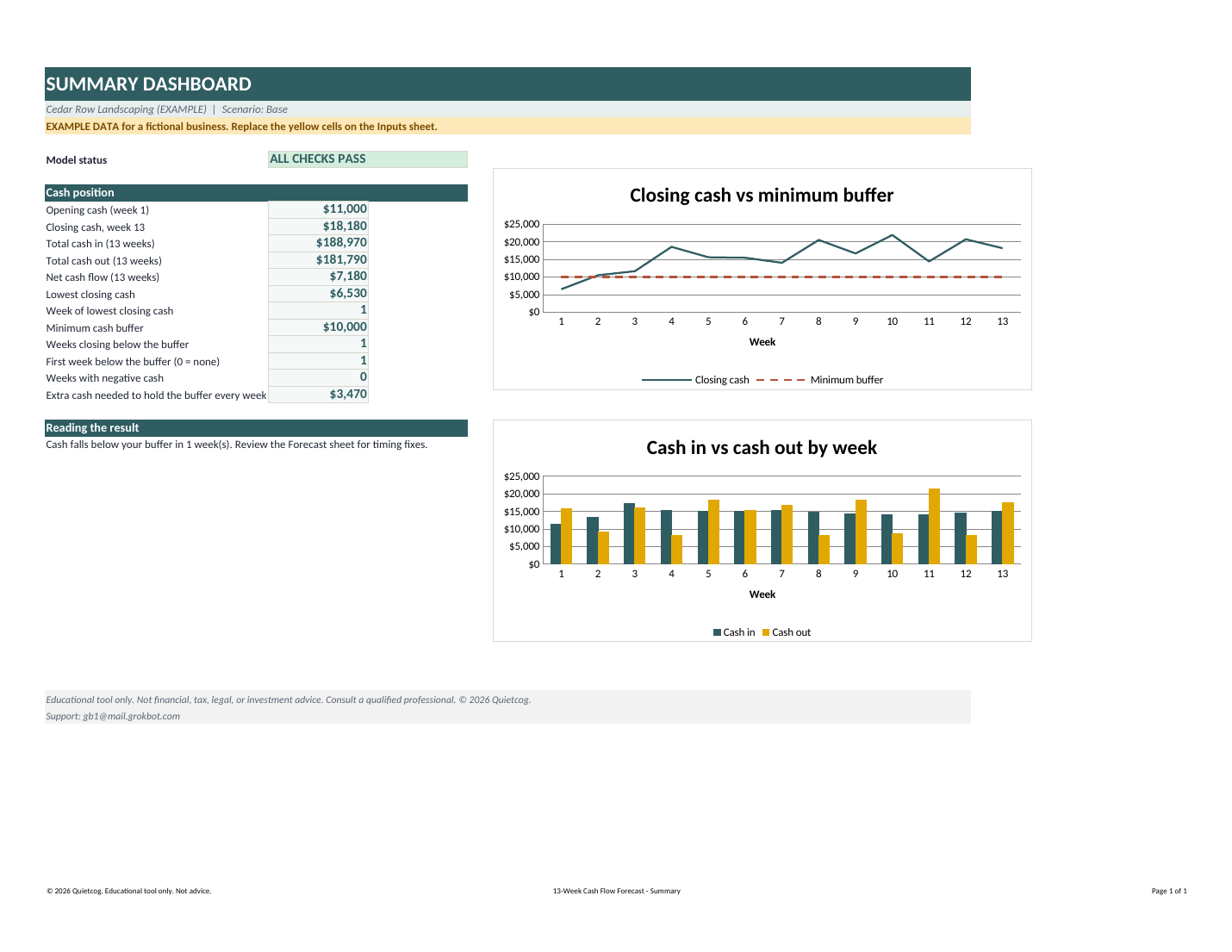
Preview of the Summary sheet with the built-in example data for a fictional business.
About this workbook
See your cash position 13 weeks ahead. Enter your opening cash, a weekly sales forecast with the share you collect each week, existing receivables, recurring bills (payroll, rent, loan payments, suppliers) and one-time items such as a tax payment or equipment purchase. The workbook spreads every item across the right week, shows closing cash for each week, flags any week below your minimum cash buffer and tells you how much extra cash you would need. A Base, Downside and Upside switch lets you stress-test weaker sales or higher supplier costs in one click. Roll it forward each week by changing the start date and opening cash. Prefilled with a fictional landscaping business. Standard .xlsx file, checked in LibreOffice Calc. No macros.
What you get
- Weekly cash in, cash out and closing cash for 13 weeks, with a minimum-buffer line on the chart
- Automatic low-cash flag per week, first week below buffer, and the largest shortfall to cover
- Collection pattern: set the share of sales collected the same week, one week later, and so on
- Recurring items weekly, every 2 weeks or monthly (due day 1-28); up to 10 one-time items by week
- Base / Downside / Upside scenario switch (sales and supplier-cost multipliers you can edit)
- 9 built-in checks; every item must land in a valid category or the check fails
- No macros, no add-ins, no external links; standard .xlsx, checked in LibreOffice Calc
What is included in the download
- Quietcog-13-Week-Cash-Flow-Forecast.xlsx
- README.md (user guide)
- LICENSE.txt (licence)
- Workbook contents: Instructions (6 steps, color key, how to roll forward weekly); Summary (status, cash position, lowest week, two charts); Inputs (cash, sales, collection pattern, recurring and one-time items, scenarios); Forecast (13 weeks: open, in, out, close, buffer headroom, status); Items (calculation sheet that places every item in its week); Checks (9 automatic tests)
$19
Buy now: $19Related templates
- Meeting, Agenda & Retrospective Kit: run a short weekly cash review and keep a decision log.
Questions
- Can I use it for more than 13 weeks? The forecast window is 13 weeks by design. Roll it forward each week by changing the start date and opening cash.
- Does it import my bank transactions? No. It is a planning workbook you type into. It does not connect to banks or accounting software.
- What kind of file is it, and how was it checked? It is a standard .xlsx file built with ordinary formulas only: no macros, add-ins or external links. We checked it in LibreOffice Calc: every workbook was recalculated and scanned for errors. If anything looks different, please tell us at gb1@mail.grokbot.com.
- Can I use it in another spreadsheet app? We have only checked the file in LibreOffice Calc. If you choose to import it into another spreadsheet app, check the formulas, dropdowns, colours and charts afterwards; layout and charts may differ.
- Is the data in the file real? No. Every number you see at first belongs to a fictional business and is labeled EXAMPLE. Overwrite the yellow cells with your own figures.
- Are the formulas locked? No passwords. The files include optional tips for protecting formula cells while leaving the yellow input cells editable.
- What is the licence? One person or one business may use and modify the files for internal use. You may not resell, share or redistribute the files themselves. The numbers and reports you create are yours. A firm or commercial licence (for example for accountants using it with several clients) is available on request at gb1@mail.grokbot.com. See LICENSE.txt in the download.
- Can I get a refund? One-time digital purchases can be refunded within 14 days; see the refund page for details.
- Is this financial advice? No. It is an educational planning tool. Educational tool only. Not financial, tax, legal, or investment advice. Consult a qualified professional. © 2026 Quietcog.
- Who do I contact for help? Email gb1@mail.grokbot.com and tell us the workbook name, the sheet and the cell.
Educational tool only. Not financial, tax, legal, or investment advice. Consult a qualified professional. The file is a standard .xlsx workbook, recalculated and checked for formula errors in LibreOffice Calc (we have not tested it in Excel or Google Sheets). No macros. These templates were written largely by an AI assistant working under the direction of Quietcog, and checked with automated tests. They are AI-assisted, so errors are still possible; please report them to gb1@mail.grokbot.com. Example data in the files is fictional. Quietcog is not affiliated with or endorsed by Microsoft or Google. Support: gb1@mail.grokbot.com. See also the terms, refund policy and privacy policy.